# Custom Instructions
Your customizable AI coding team that learns!
Use it to create apps or make changes/additions to existing ones.
This set of instructions (markdown files) enhances and extends the modes/agents that come with many coding agents/assistants/scaffolds. The instructions are tailored to work with Kilo Code (free highly customizable VS Code extension) but – with small modifications – will work with many others, including Cursor, CLine, Roo Code, Github Copilot, etc.
Using the built-in-to-Kilo ability to use “rules” files, this archive is a set of custom instructions for the built-in modes/agents and some new ones, including:
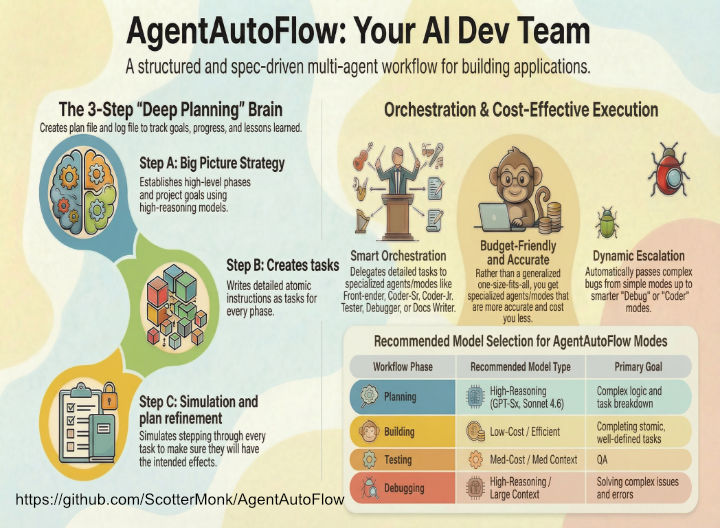
– **Architect Super Team**: a 3-step “Planner” process (planner-a, planner-b, planner-c). Brainstorms with user. While planning and working, creates detailed files to keep track of its goals, progress, and lessons learned.
– **Architect Quick**: a 1-step “Planner” process; modified Kilo’s built-in Architect mode to be more detailed but for smaller tasks than full on 3-step “Planner” process.
– **Dispatcher**: I’ve moved much more of the detail work (like making atomic tasks) out of the old/default Orchestrator and into the planning phase so that Dispatcher can be relatively dumb/cheap and merely follow orders to send out detailed tasks to whatever modes are part of each task description.
– **Coder-Sr**: Juiced up Code mode to follow The Plan, whether created by the new superpowered Architect or hastily typed out by a user running 3 days on caffeine.
– **Coder-Jr**: Supplemented Coder-Sr with a tightly controlled budget-friendly Junior Coder created to work with the short, detailed tasks created for it by Planner or Architect or do simple coding tasks for the user.
– **Other modes added**: Added GitHubber, Tasky, Docs Writer, Researcher, etc.
Notes:
– **Smart but cheap**: Designed both Architect and Planner modes to “front load” spend on high “intelligence” thinking models to create a plan that is so detailed, the “Workers” like Dispatcher, Coder-Sr, Coder-Jr, etc. can be faster/cheaper models. Overall, I’m finding this method burns *far less* tokens, has *far less* errors, and runs longer without a need for human intervention.
– **Look how fast they grow up**: This set of instructions is ever-evolving.
– **Virtuous circle**: The author, Scott Howard Swain, uses this “Team” every day, is constantly tinkering with it, and is always eager to hear ideas to improve it.
– **Every time you see .kilocode below, that means the folder containing rules and skills for whatever scaffold you are using.**
– For example, it may be “.kilocode” or “.roo”.
– **Every time you see Kilo Code below, that means the name of the scaffold you are using.**
– For example, it may be “Kilo Code” or “Roo Code” or “CLine” or one of the others supported by AgentAutoFlow.
## Setup
**Give credit to the creator**.
This application is a labor of love.
It’s *free to use, fork, change with no licensing rules*.
Please show your love by starring the repo at:
https://github.com/ScotterMonk/AgentAutoFlow
“`bash
py -m pip install -r requirements.txt
“`
The browser-use skill requires a download of browser binaries:
“`bash
playwright install chromium
“`
## Skills
**Benefits**:
– Consume far less tokens.
– Use up less of models’ oh-so-precious context memory.
– Follow instructions better.
– Reduced need for costly MCP.
**Location/use**:
I’ve added quite a few skills in the `{base folder}/.kilocode/skills` folder.
– Kilo Code’s docs: https://kilo.ai/docs/
– Roo Code’s docs: https://docs.roocode.com/features/skills
– They use the *Agent Skills Open Format*.
**Some Skills libraries**:
– A skill marketplace with over 530,778 skills! https://skillsmp.com
– https://agentskills.io/home
– https://skills.sh/jeffallan/claude-skills
## When/how to use AgentAutoFlow?
### Building a new app
If building a new app, *Architect* and *Planner abc* assume you already know *specs* for the project (stack, guidelines, etc). That’s just one layer “higher” than these instructions are built for.
#### Pre-planning
Possibly coming soon: a level above “Planner” where you brainstorm on a high level to get ideas for *specs* to feed planner.
Until then, use “Ask” mode in Kilo Code or – more economical – query your favorite LLM chat to help you sculpt your *specs*.
**Save money** by using the following in your browser for free until they reach their limits:
– https://grok.com <- This one may require you have an x/titter account.
– https://claude.ai
– https://chatgpt.com
– https://aistudio.google.com/prompts/new_chat
### Use cases for modifying your existing app
#### Example of small workflow
Scenario: Fixing a bug, modifying front-end, or adding a function.
– Use “coder-sr”, “coder-jr”, “githubber”, “tasky”, etc., as appropriate.
#### Example of a medium or large workflow
Scenario: Building a new dashboard screen.
**Planning**
1) Start with “planner-a” (for med/high size work) or “architect” (for low/med size work) mode.
– For this mode, I choose a model with high reasoning and large-as-possible context window. Why? Because AgentAutoFlow’s planning modes do the “heavy lifting,” creating a plan file that has atomic detail so that Dispatcher and the other modes in the chain can be relatively “dumb”.
– *Mode choice examples* (note – I change these often, your mileage may vary):
– Architect: *Use Reasoning model* for intelligence and context window. I choose the large context window here because this modified architect mode does what Planners a/b/c all do, combined.
– Planner-a: This mode seeks to understand your goal, investigates relevant project files/functions, and creates a big picture. Brainstorms with user to determine high level plan. Creates “Phase(s)”. *Use reasoning model*.
– Planner-b: Populates Phase(s) with detailed atomic Task(s). Don’t worry about planner-b receiving a large context window from planner-a. It will only receive the in-progress plan file from planner-a. *Use reasoning model*
– Planner-c: Detailed task simulation and refinement. Don’t worry about planner-c receiving a large context window from planner-b. It will only receive the in-progress plan file from planner-b. *Use reasoning model*.
2) Tell it what you want.
– It will brainstorm with you, asking questions, including:
– *Complexity*: How do you want the work plan to be structured in terms of size, phase(s), and task(s)? It will recommend one. It will automatically create tasks so they are “bite-size” chunks less smart/lower-cost LLM models can more easily do the actual work.
– *Autonomy*: What level of autonomy do you want it to have when it does the work?
– *Testing*: What type of testing (browser, unit tests, custom, none) do you want it to do as it completes tasks?
– It will create a plan and ask you if you want to modify it or approve.
– It will then create a plan file and log file.
*Why are these files useful for the plan?*
– Keep track of goals.
– Keep track of progress – if planning or execution is interrupted, you can easily get back on track.
3) Once you approve the plan, if using planner-a, it will pass on to the other planner modes to flesh out and add detail to the plan. If using architect mode, that mode will do what planners a/b/c all do but with a bit less “care” and cost in time/tokens.
– Eventually, once you approve, it will pass the plan (with detailed instructions, mode hints, etc.) on to the “Dispatcher” mode.
**Dispatcher (based on Orchestration)**
– As you probably gathered, I’ve moved much more of the detail work (like making atomic tasks) out of the old/default Orchestrator and into the planning phase so that Dispatcher can be relatively dumb/cheap and merely follow orders to send out detailed tasks to whatever modes are part of each task description.
**Mode budgeting**
– Note: This workflow will sets the plan to choose between “code,” “code monkey,” and “tasky” modes, depending on complexity. If “tasky” or “code monkey” get confused because a task is too difficult or complex, they have instructions to pass the task up to “code” mode which I assign a “smarter” LLM to.
## Kilo Code specific
### Terminal commands
For me, in Windows with a preference for Powershell, I’ve found termminal commands work better with the following setting:
`Setting -> Terminal -> Use Inline Terminal <- Unchecked.`
Your mileage may vary.
## Folder structure
These files go in your project root (“app” in this case). You’ll see they coincide with where your current .kilocode folder is.
“`
app/
├── AGENTS.md (must be all caps)
├── .kilocodemodes
└── .kilocode/
├── docs/
│ ├── database_schema.md
│ ├── learning/
│ ├── old_versions/
│ ├── plans/
│ ├── plans_completed/
│ └── reports/
├── rules/
│ ├── 01-general.md
│ └── 02-database.md
├── rules-architect/
│ └── 01-architect.md
├── rules-ask/
│ ├── 01-ask.md
│ ├── 02-ask-health.md
│ └── 03-ask-flora-growing.md
├── rules-coder-jr/
│ └── 01-coder-jr.md
├── rules-coder-sr/
│ └── 01-coder-sr.md
├── rules-dispatcher/
│ └── 01-dispatcher.md
├── rules-docs-writer/
│ └── 01-docs-writer.md
├── rules-githubber/
│ └── 01-githubber.md
├── rules-planner-a/
│ └── 01-planner-a.md
├── rules-planner-b/
│ └── 01-planner-b.md
├── rules-planner-c/
│ └── 01-planner-c.md
├── rules-tasky/
│ └── 01-tasky.md
└── skills/
└── big list that changes semi-often
“`
## Todo list tool
In Kilo Code settings, under “Providers”, when you set up a Configuration Profile:
Like let’s say you are adding “Claude-Sonnet-4x-R-M” as the profile name, with API provider “OpenRouter” or “Anthropic”. The new configuration one will have “Enable todo list tool” (in “Advanced settings”) turned on by default.
The todo list tool burns extra tokens and – especially if you are using AgentAutoFlow – you don’t need the todo list tool. I recommend going to the bottom of all the models you have set up and turning “Enable todo list tool” off.
## AgentAutoFlow File Sync Utility
**Helpful utility included**: A Python utility for synchronizing `{scaffold folder}` directories across multiple project folders based on file modification times.
### Overview
The AgentAutoFlow File Sync Utility scans `{scaffold folder}` subdirectories in multiple project folders (you designate), identifies files that need updating based on modification times, and performs intelligent file synchronization with atomic operations and backup support.
### GUI Usage
Launch the graphical interface with:
“`bash
python main_gui.py
“`
Use the interface to:
– Select multiple folders containing `{scaffold folder}` directories.
– Configure sync settings via the Settings window and config.txt (dry-run mode, backup options).
– Monitor live progress during synchronization.
– Overwrite preview panel that shows planned overwrites before execution.
– Favorite folder sets (based on folders_faves in config) to quickly re-load common project combinations.
– Auto-creates .bak versions of all modified files.
– Button to remove all .bak files.
### CLI Usage
Run headless synchronization with:
“`bash
python cli_sync.py <folder1> <folder2> …
“`
Example:
“`bash
python cli_sync.py /path/to/project1 /path/to/project2 /path/to/project3
“`
### Configuration
Settings are stored in `config.txt` See `README-file-sync.MD` for details.
## Fit to you
Be sure to modify the content of files to fit your project. Especially:
– “agents.md” (In root, “above” {scaffold folder}). Important file. See `/init` in this document.
– “{scaffold folder}/docs/database_schema.md”.
– “{scaffold folder}/rules/01-general.md”.
– “{scaffold folder}/skills/{skill name}/agents*.md” <– within skill folders, name your project-specific information with this pattern and refer to it from the SKILL.md file.
Really, I’d look through all the rules files to modify to YOUR preferences.
### Misc
– I’ve added “Dispatcher” to .kilocodemodes local mode file so that I can give it read, edit, and command permissions. Without those permissions, it can’t update the log file. Also, depending on what LLM model you have it using, I’ve seen it find an issue with The Plan and spend extra tokens to delegate minor textual changes to The Plan when it could have more quickly done the changes itself.
### IMPORTANT: agents.md
If your agentic assistant has an /init or other command that analyzes your codebase and creates tailored configuration files, use it. Kilo Code uses /init.
#### Init
Optimally, use a high reasoning, large context-window model.
Type into chat: “/init”.
Note: If you type only “/init”, the LLM may create agent.md files in other folders (like within the various rules subfolders in the .kilocode folder).
## My recipe for getting a lot done inexpensively:
Some of the tips below are subject to change often, especially which models to use for which mode.
1) Use *free* Kilo Code.
2) Use *free* AgentAutoFlow (just a bunch of .md files telling modes exactly how to act, delegate, and more).
3) Pick the right models for each mode:
**Front-loading the intelligence**:
The following tips are based on the way AgentAutoFlow “front loads” the heavy-lifting (deep thought) in the architecting/planning, making plans so detailed and tasks so atomic, that when a “worker” mode gets its assignment, it knows *exactly* what to do. That allows you to use “dumber” models for “worker” tasks. That said, I still assign a pretty “smart” model to “Code” mode.
**Modularity and low context usage**:
When creating a plan based on user input, for larger projects, I divided “architect” up into “planner-a, b, c” so that, for example, “planner-a” will process user query and brainstorm with user to create a high level “plan” file. It will then pass that file on to “planner-b”. This mode-switch provides a new fresh context window to do its work in. It will then create *very* detailed tasks that may include, per task:
– Either pseudo-code or code.
– Mode hints. Ex: “Use this mode: Coder-Sr”, “Coder-Jr”, “Tasky”, etc.
– **Architect** and **Planner (team)**: Opus 4.x | Sonnet 4.x.
– **Coder-Sr**: Sonnet 4.x. Note: Current GPT 5.4 is lazy and sloppy. I had found 5.1-5.2 to be very efficient but I’m taking a break from OpenAI until they get back on track. IF you must use it: I used it OpenAI, choosing “Flex” service tier because I’m fine with how slow it is for saving $.
– **Coder-Jr**: Grok 4.x | Gemini 3.x Flash (through OpenRouter is least expensive) or any comparable model because “Architect” (AgentAutoFlow’s version) and “Planner” team write a very detailed plan that even includes pseudocode or code so that when the plan gets delegated by Delegator, Code and Code Monkey know *exactly* what they are expected to do.
– **Tasky** and **Githubber**: Gemini 3.x Flash or one of those dumb-and-cheap models mentioned above. The AgentAutoFlow’s “Architect” and “Planner” subteam both know to delegate all file copying, and other simple tasks to this mode so your expensive models aren’t wasting money on stuff like that.
## Markdown vs XML
For LLM instruction following, which should you choose?
### If Kilo Code, your choice is clear
Kilo Code’s native architecture employs Markdown files (.md or .txt) stored in `{base folder}/.kilocode/rules/` directories for all custom instructions. After reviewing 171+ community-created custom modes, zero use XML formatting. The platform concatenates these Markdown files directly into Claude’s system prompt in alphabetical order. YAML or JSON handle mode configuration, while instruction content remains plain Markdown.
This universal adoption of Markdown isn’t documented as a deliberate choice over XML—the official Kilo Code documentation simply doesn’t address XML at all. The format appears to be selected for developer experience and ecosystem compatibility rather than AI performance optimization. Markdown files integrate seamlessly with version control, text editors, and documentation workflows that developers already use.
### The human factor
Why I still use and prefer markdown:
– Ease of human read/write.
– Kilo Code (my current favorite framework) prefers it.
– I find that no matter what model I’m using, they follow the rules I’ve created in markdown format.
## Use and share as you wish
Created in Summer 2025 by
Scott Howard Swain
https://OceanMedia.net
**Give credit to the creator**.
This application is a labor of love.
It’s *free to use, fork, change with no licensing rules*.
Please show your love by starring the repo at:
https://github.com/ScotterMonk/AgentAutoFlow
You are responsible for
any benefits or problems
encountered as a result
of using this archive.
Also, I’m looking for work.










Recent Comments